
This guide explains how to configure ESF Database Migration Toolkit to connect to an IBM Informix database. Informix is a robust relational database management system developed by IBM, commonly used in enterprise environments for high-volume transaction processing. Once connected, you can migrate data between Informix and other database platforms seamlessly.
Table of Contents
Don't have ESF Database Migration Toolkit yet? Download the free trial and start migrating in minutes!
Start ESF Database Migration Toolkit and press the "Next" button. In the "Choose a Data Source" dialog, select Informix as the database type.
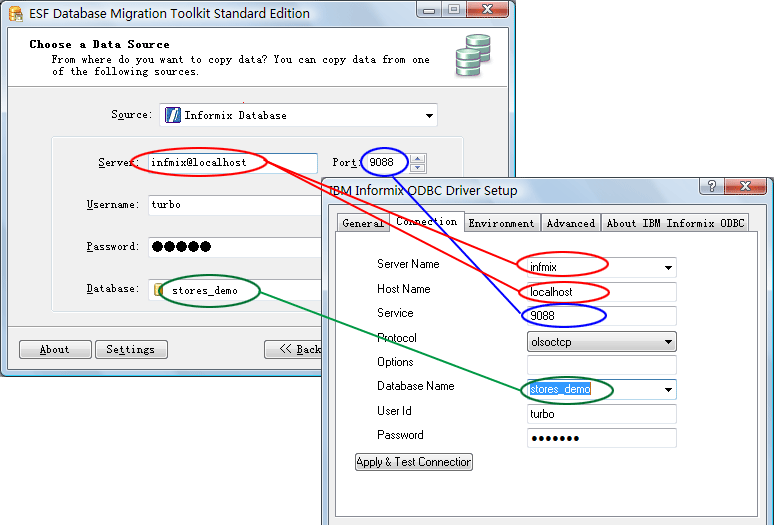
Server_Name@Host_Name
(If the host is localhost, you can simply enter the Server_Name)9088)Once connected to Informix, you can:
If you receive an "ODBC driver not found" error, verify that the IBM Informix ODBC driver is correctly installed. Check Windows ODBC Data Source Administrator (search for "ODBC" in the Start Menu) to confirm the driver appears in the list.
If the connection times out, check: (1) the Informix server is running and accessible from your network, (2) the server name format is correct (Server@Host), (3) the port number is correct and not blocked by a firewall.
Verify your username and password are correct. Informix uses operating system-level authentication in some configurations. Consult your database administrator if you're unsure about the correct credentials.
ESF Database Migration Toolkit supports IBM Informix IDS 11 and later versions. Check the features page for the latest compatibility information.
You only need the IBM Informix ODBC driver installed on the same machine where ESF Database Migration Toolkit is running. The program handles the rest automatically.
Yes. Once connected, you can migrate data from Informix to any supported destination database, including SQL Server, Oracle, MySQL, PostgreSQL, and more.
Verify that: (1) the Informix server is running and accessible from your network, (2) the ODBC driver is properly installed, (3) the server name, host, port, and credentials are correct, and (4) firewall rules allow outbound connections to the Informix port.
Yes. ESF Database Migration Toolkit runs on Windows and can connect to Informix servers running on any platform (Windows, Linux, Unix) as long as the network connection and ODBC driver are properly configured.
If you have any questions or suggestions, please contact us. Thank you for your time!