ScreenShots — ESF Database Migration Toolkit
Explore the intuitive interface of ESF Database Migration Toolkit. Our step-by-step wizard makes database migration simple and efficient.
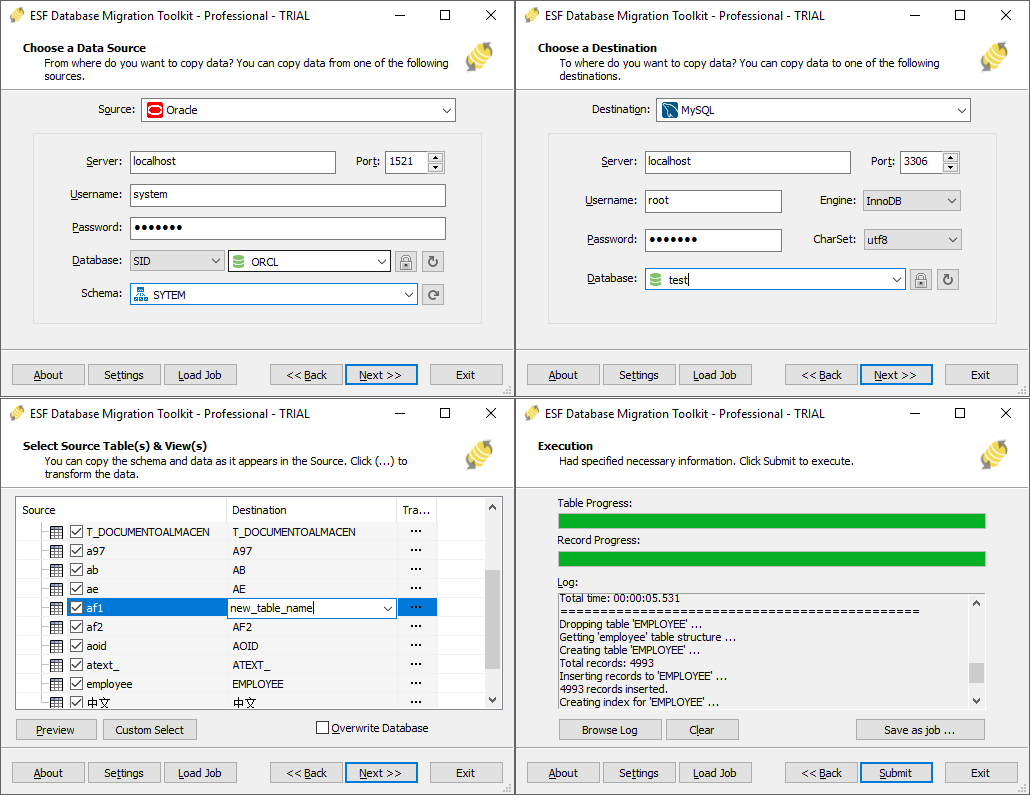
ESF Database Migration Toolkit — Main Interface
The intuitive wizard guides you through 3 simple steps: choose source database → choose destination → execute migration.
Other Screenshots
- Source Database Selection — Choose from Oracle, MySQL, MariaDB, SQL Server, PostgreSQL, IBM DB2, IBM Informix, MongoDB, InterSystems Caché, Teradata, Visual Foxpro, SQLite, FireBird, InterBase, Microsoft Access, Microsoft Excel, Paradox, Lotus, dBase, CSV/Text and any ODBC DSN
- Destination Configuration — Configure target database connection settings
- Table & Field Mapping — Customize column mappings, data types, and filters
- Migration Progress — Real-time progress tracking with detailed logs
- Completion Report — Comprehensive summary of migrated records and any errors
Download Now »